Categories
seo

How Online Merchants Can Now Easily Share Shipping & Returns Information with Google

Shipping speed, delivery costs, and return policies play a major role in shaping online shoppers’ decisions. When customers clearly understand how fulfillment works, it helps build trust, improves transparency, and enhances the overall shopping experience. To support merchants in providing accurate fulfillment information, Google is expanding how websites can share shipping and return policies even if they do not have a Merchant Center account. This update gives more flexibility, better search visibility, and easier management options for online businesses.

New Ways to Share Your Policies with Google

Google now supports two methods for merchants to share shipping and returns information:

1. Configure Policies Directly in Search Console

Google is expanding the “Shipping and returns” settings within Search Console for all websites identified as online merchants. Previously, this feature was limited to websites linked to Merchant Center. Now, if Google recognizes your site as an online store, you can: Add or edit your shipping policies Add returns information Manage everything with a simple UI Ensure Google displays the most accurate fulfillment details Important: Settings added in Search Console will override any shipping or returns of details shared through structured data. This update will roll out globally over the coming weeks across all languages.

2.Add Organization-Level Shipping Policy Structured Data

For merchants who prefer using markup, Google is introducing organization-level shipping policy structured data. This enhancement complements last year’s rollout of organization-level return policy markups. Benefits include: No need to add shipping markup to every individual product page Easier to maintain one general policy for the entire website Ideal when most products follow the same fulfillment rules If product-level shipping information exists, Google will give it priority over the general organization-level policy.

How to Implement It

Add the shipping structured data under the Organization schema on your shipping policy page. Use Google’s Rich Results Test to validate your markup by entering your URL or pasting the code snippet. For online stores or local shops, Google recommends using Online Store or Local Business as subtypes of Organization.

Why These Updates Matter for Merchants


By providing accurate shipping and returns information through either Search Console or structured data, merchants can:

Improve visibility in search results

Highlight important fulfillment benefits (free shipping, fast delivery, easy returns)

Enhance appearance in knowledge panels, brand profiles, and product search listings

Build trust with customers before they even visit the website

This helps merchants attract more qualified shoppers and drive better conversions.

Final Thoughts

These new options make it easier than ever for merchants large and small to share their fulfillment policies across Google’s surfaces. Whether you prefer a simple UI in Search Console or the flexibility of structured data, you now have more control over how you’re shipping, and return information appears in search results.

Categories
seo

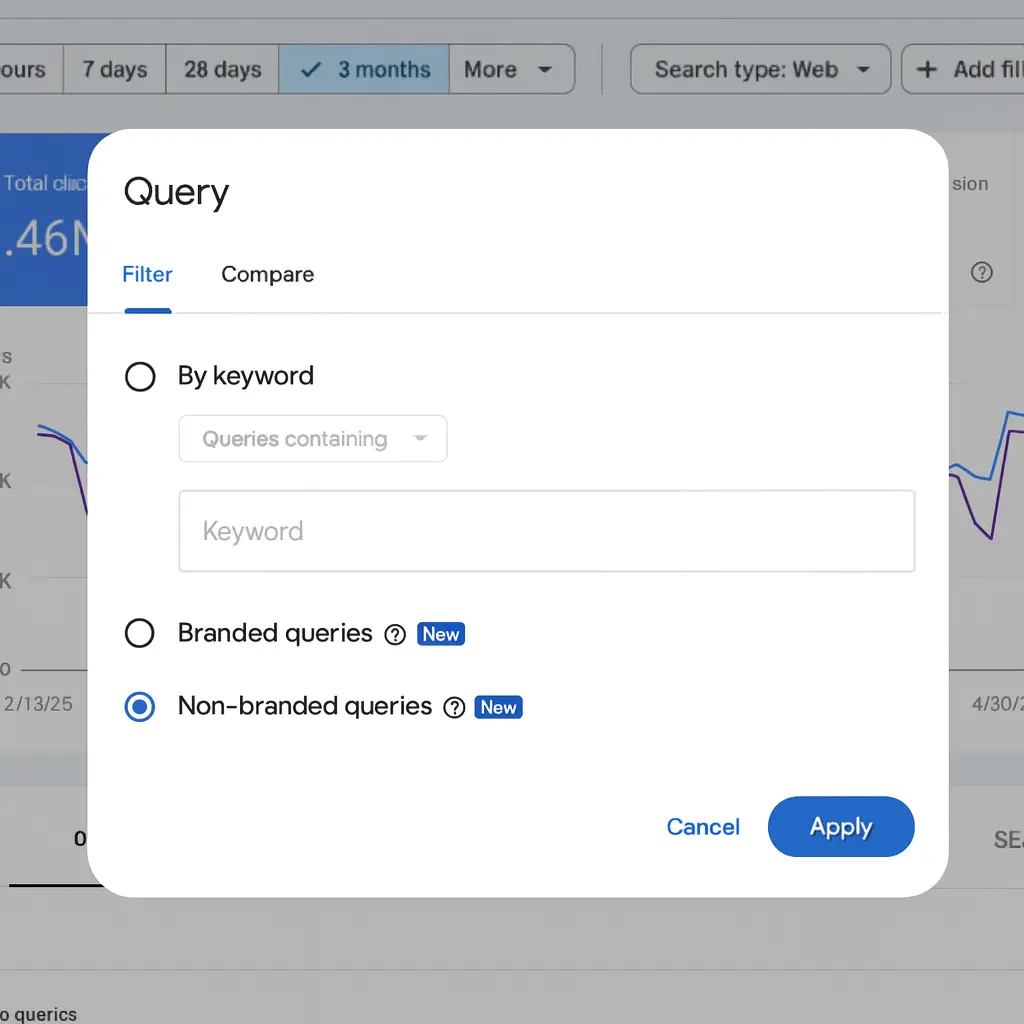
Google Search Console Adds Branded vs Non-Branded Queries Filter

If you love tracking your website’s performance through Google Search Console, there’s a new update you’ll want to explore. After rolling out Query Groups recently, Google has now added another super useful tool:  

The Branded Queries Filter. 

This update basically helps you understand how much of your traffic comes from people who already know your brand vs. people discovering you for the first time. 

And trust me, this is a game-changer for SEO planning. 

Let’s break it down in the simplest way possible. 

What Exactly Is a Branded Query?

A branded query is any search that includes your brand name, or something closely related to it. 

For example: 

  • Your brand name: Google 
  • Misspellings: Gogle 
  • Product names related to your brand: Gmail, Google Maps, Google Sheets 

So if someone searches “Nike shoes”, “Nike store near me”, or even “Niky”  those are branded queries. 

Google Search Console query filter

On the other hand, non-branded queries would be things like: 

  • “running shoes for men” 
  • “best sports shoes” 
  • “comfortable gym shoes” 

These don’t mention your brand, so these searches are from people who may not know you yet. 

Why Does This Matter?

Because branded and non-branded traffic behaves totally differently: 

Branded Traffic

People already know you. 

They’re usually searching with intention, maybe to buy, maybe to check something. 

This traffic usually has: 

  • Higher click-through rates 
  • Higher rankings 
  • Better conversions 

Non-Branded Traffic

This is where your real SEO growth comes from. 

These users don’t know your brand yet but find you because of your content. 

This traffic shows: 

  • How well your SEO is working 
  • Whether your content is helping you reach new audiences 
  • Your organic reach beyond your brand name 

So, What Did Google Add?

Inside Search Console’s Performance Report, you now get two filters: 

✔ Branded 

✔ Non-branded 

This means you can see impressions, clicks, CTR, and ranking separately for both groups. 

You can also apply this filter across: 

  • Web results
  • Image search 
  • Video search 
  • News search 

This gives you a much clearer picture of how people find you online. 

A Quick Example to Make It Crystal Clear

Let’s say you run a website called FreshFit Meals. 

Branded Queries Example:

  • freshfit meals 
  • fresh fit meal plans 
  • freshfitmeals login
  • ff meals 
  • freshfit protein bowls 

Non-Branded Queries Example:

  • healthy meal plans for weight loss 
  • best affordable diet meals 
  • weekly meal prep ideas 
  • high protein vegetarian meals 
Type Clicks Impressions CTR Position
Branded 1,800 4,000 45% 2
Non-Branded 3,200 95,000 3.4% 18

This tells you a lot: 

  • Your brand is strong → 45% CTR on branded searches 
  • You’re reaching a wider audience through non-branded searches 
  • But your non-branded ranking is lower → You need more SEO work, blogs, and optimization for those queries 

This is exactly where the new filter helps you instantly understand your real SEO performance. 

How Does Google Identify Branded Queries?

Here’s the interesting part: 

Google is not using simple keyword matching or regex. 

Instead, it uses an AI-assisted system that automatically understands: 

  • Your brand name 
  • Misspellings 
  • Brand names in multiple languages 
  • Product names unique to your brand 
  • Brand-related queries without the brand mentioned 

This means if your site is known for a unique product like “FreshFit Protein Bowl,” the query “protein bowl FreshFit style” might also be tagged as branded. 

Of course, because it’s AI-driven, some queries may occasionally be misclassified. Google admits that it is upfront. 

New Addition: Brand Traffic Insights Card

Inside Search Console Insights, you will now see a small card showing: 

  • Branded traffic (clicks) 
  • Non-branded traffic (clicks) 

This makes it easy to understand how much your brand awareness is growing over time.

When Will You See This Feature?

It’s rolling out gradually. 

If you don’t see it yet, these might be the reasons: 

1.Your property is not a top-level property 

(Meaning subdomains or /path URLs won’t have this feature.) 

2.Your site doesn’t have enough data/signals yet. 

Give it some time, it’s coming. 

Final Thoughts

This new branded vs non-branded filter is extremely helpful for: 

  • SEO planning 
  • Content strategy 
  • Brand awareness tracking 
  • Understanding user behavior 
  • Reporting to clients 

If you’re serious about improving organic performance, this feature will make your analysis much easier and smarter. 

So go ahead, open Search Console, click Performance → Search Results → and check if the new filter is live for you. 

And once you start using it, you’ll wonder how you managed without it. 

Categories
seo

Google Search Console Just Got Smarter: Custom Annotations Are Here!

Google just rolled out a significant update for Search Console users, and it’s the upgrade many of us have been anticipating 

What Are Custom Annotations? 

Think of it as adding sticky notes to your Search Console performance charts. Now you can mark important dates with your own notes, making it super easy to connect the dots between your actions and traffic changes. 

Why Custom Annotations Matters

Ever looked at your traffic graph and wondered: 

  • Why did traffic spike on March 15th?
  • When exactly did we launch that new blog category?
  • Did that site redesign help or hurt our rankings?

Now you can add notes directly on your charts to remember these crucial moments. 

Actionable Ideas You Can Start Using in Google Search Console 

Here are some practical ways to use annotations: 

Example 1: Content Updates

Date: October 5, 2025 
Annotation: “Updated top 10 blog posts with 2025 data” 
Result: Track if refreshed content improved rankings 

Example 2: Technical Changes 

Date: September 12, 2025 
Annotation: “Migrated to new hosting provider” 
Result: Monitor if site speed improvements affected traffic 

Example 3: SEO Strategy

Date: August 20, 2025 
Annotation: “Started targeting long-tail keywords” 
Result: See if your strategy shift paid off 

Example 4: External Events

Date: November 24, 2025 
Annotation: “Black Friday sale started” 
Result: Compare seasonal traffic patterns year-over-year 

Example 5: Algorithm Updates

Date: July 10, 2025 
Annotation: “Google core update rolled out” 
Result: Identify if algorithm changes impacted your site 

How to Add an Annotation on your Google search Console

It’s incredibly simple:

    1. Open your Search Console Performance Report
    2. Right-click anywhere on your performance chart
    3. Select “Add annotation”
    4. Write your note (up to 120 characters)
    5. Pick the date

That’s it! Your annotation will appear as a marker on your chart.

Best Practices

DO: 

  • Be specific and concise (you only get 120 characters) 
  • Mark major SEO changes immediately 
  • Note both wins and losses 
  • Include dates for site migrations, redesigns, and major updates 
  • Track external events affecting your niche

DON’T: 

  • Include sensitive personal information (annotations are visible to all property users) 
  • Use vague descriptions like “made changes” 
  • Forget to add dates for team activities 
  • Clutter charts with minor daily tweaks 

Who Can See Your Annotations?

Important: Everyone with access to your Search Console property can see these annotations. Keep them professional and avoid including: 

  • Personal contact information 
  • Confidential business data 
  • Internal company details that shouldn’t be shared 

Perfect for Teams

If you work with multiple people on SEO: 

  • Agencies can show clients exactly when work was completed 
  • In-house teams can coordinate across departments 
  • Freelancers can document their efforts for reporting 
  • Managers can track which strategies work 

Why You'll Love This Feature

Before annotations, you’d have to: 

  • Keep separate spreadsheets 
  • Check email histories 
  • Try to remember dates from memory 
  • Cross-reference multiple tools 

Now everything lives right where you need it in your performance charts.

Getting Started 

This feature is available now in Google Search Console. No setup required, no settings to configure. Just open your performance reports and start annotating! 

Our Recommendation

Start using annotations today for: 

  1. This week’s activities: Document what you’re working on right now 
  2. Upcoming changes: Add future dates for planned updates 
  3. Past milestones: Go back and mark major events from the last 6 months 

Three months from now, you’ll thank yourself when you can instantly see why traffic changed. 

Final Thoughts

Custom annotations might seem like a small feature, but for anyone serious about SEO, it’s a massive quality-of-life improvement. No more guessing, no more digging through old notes you have just clear, visual connections between your actions and results. 

Have you tried custom annotations yet? What are you planning to track? Share your thoughts in the comments below!