Categories
Trending

Your Hub for Actionable Marketing Knowledge

Categories
Trending

Top 35 Free Business Listing Sites in 2026

Business listing sites in 2026 remain essential online directories where companies register details like name, address, phone (NAP), and services to enhance discoverability. Platforms such as Google Business Profile, Yelp, and Bing Places dominate, alongside niche and regional directories, offering both free and premium options for broader reach. These sites aggregate business data, aiding search engines in verifying legitimacy and relevance. 

SEO Strategies That Increase Search Visibility and Brand Discoverability 

Business directories boost local SEO by creating consistent citations that signal trustworthiness to algorithms like Google’s, improving map pack and organic rankings. They drive referral traffic from users by browsing directories directly and enhance authority through verified profiles. In 2026, with rising “near me” and voice searches, optimized listings ensure prominence in AI-driven results.  

Value for Free Listings

Free listings on high-authority sites provide startups, SMEs, and service businesses with cost-effective visibility without ad spend. Consistent NAP across directories strengthens local signals, leading to 52% more exposure on average. These profiles enable review of collection and customer engagement, fostering trust and growth for resource-limited ventures. 

Free business listing sites are online directories that allow companies to create profiles at no cost, displaying essential details to attract customers. These platforms function like digital yellow pages, categorizing businesses by location, industry, or services for easy discovery. 

Customer Discovery Process

Customers search these sites using keywords, locations, or categories, pulling up relevant profiles with maps, reviews, and contact info for quick access. Search engines integrate directory data into results, map packs, and voice searches, directing users to nearby options efficiently. This boosts foot traffic and inquiries by matching search intent with verified listings.

Free Business Listing Sites

Sr No Website DA PA Business Description
1 https://mapsconnect.apple.com 99 98 A trusted business partner offering smart digital growth services.
2 https://business.google.com/ 94 88 Google My Business (GMB).
3 https://www.bing.com/forbusiness/ 93 53 Helping businesses grow online through smart digital solutions.
4 https://www.trustpilot.com/ 93 73 Customer-focused digital solutions delivering real business value.
5 https://foursquare.com/ 92 77 Professional digital services helping brands reach the right audience.
6 https://www.crunchbase.com/ 91 69 Empowering brands with innovative digital and marketing solutions.
7 https://www.bbb.org 91 71 Professional digital services helping brands reach the right audience.
8 https://www.mapquest.com 87 68 Easy directions to a trusted local business.
9 https://www.manta.com/ 81 62 Supporting businesses with reliable and scalable digital solutions.
10 https://www.owler.com/ 74 57 Competitive, data-driven digital services for ambitious brands.
11 https://clutch.co/ 72 65 A top-rated digital company delivering quality, performance, and trust.
12 https://www.slideserve.com/ 71 63 Showcasing innovative ideas through smart digital strategies.
13 https://www.comparably.com/ 64 57 A people-driven company building impactful digital experiences.
14 https://www.brownbook.net/ 62 59 End-to-end digital services tailored to business needs.
15 http://connect.releasewire.com/ 58 49 Delivering trusted news, brand visibility, and digital growth solutions.
16 https://www.callupcontact.com 57 58 Connecting customers with businesses through trusted listings.
17 https://www.cybo.com/ 55 60 Helping businesses gain visibility through trusted online listings.
18 https://themanifest.com/ 55 54 Reliable digital services designed to scale businesses worldwide.
19 https://www.goodfirms.co/ 55 55 Providing scalable and dependable services for modern businesses.
20 https://www.lacartes.com 54 57 Improving business visibility through structured online listings.
21 https://www.clickindia.com 50 47 A Your personal marketplace
22 https://www.builtinaustin.com 53 45 A modern digital company driving innovation and results.
23 https://www.ibegin.com 52 54 A reliable business profile with verified contact information.
24 https://www.sortlist.com/ 48 50 Strategic digital partner for brands seeking sustainable growth.
25 https://www.agencyspotter.com/ 45 48 A performance-focused agency delivering measurable business impact.
26 https://www.asklaila.com 44 51 Trusted digital experts delivering growth-oriented solutions.
27 https://www.b2byellowpages.com/ 42 51 B2B digital services designed to drive efficiency and growth.
28 https://www.fyple.com 40 53 Making business discovery easy and reliable.
29 https://ixtenso.com/ 36 47 Business-focused digital solutions for global market growth.
30 https://www.411.info 35 51 Providing accurate business information for easy customer discovery.
31 https://selectedfirms.co/ 35 46 Expert-led digital solutions built for modern business success.
32 https://superbcompanies.com/ 26 45 A results-driven digital services company focused on scalable growth.
33 https://www.locanto.org/ 19 29 Affordable and effective digital solutions for growing businesses.
34 https://topline.com/ 18 41 High-performance digital services that deliver measurable ROI.
35 https://findbestfirms.com/ 13 33 A reliable partner offering proven digital growth solutions.

Business Listing Information Required for Better SEO and Visibility

Core details include Business Name for identification, Address for local mapping, Phone number for direct calls, Website for deeper engagement, and Category to match services with user needs. Additional fields like hours, photos, and descriptions enhance appeal, but NAP consistency across sites is key for SEO trust signals. 

Business listings remain crucial in 2026 for businesses seeking competitive edges in digital landscapes dominated by AI and local searches. They provide foundational signals for search engines to validate and rank companies effectively.

Visibility and Brand Boost

Listings on high-authority directories expand online presence by exposing business details to millions of browsing categories or locations. Consistent profiles across platforms reinforce brand recognition, making companies more memorable amid crowded search results. This heightened exposure translates to stronger market positioning without heavy ad investments.

Local SEO and Maps Edge

Directories create NAP citations that Google uses to enhance map pack and local pack rankings, vital for “near me” queries surging in 2016. Optimized listings improve geographic relevance, pushing businesses higher in voice and mobile results. Physical stores see direct lifts in foot traffic from integrated maps and directions.

Trust via Reviews and Citations

Reviews on directories build credibility, as 67% of users check them weekly before engaging, influencing purchase decisions. Multiple citations signal legitimacy to algorithms and customers alike, fostering authority. Active management of feedback turns profiles into trust hubs.

Traffic and Lead Generation

Users actively seek services on directories to generate qualified referral traffic, often converting at higher rates than cold ads. Links from authoritative sites provide backlinks that bolster domain strength over time. This passive funnel drives inquiries, calls, and sales for sustained growth. 

Selecting the best business listing sites in 2026 involves evaluating metrics like domain authority (DA) above 50, alongside relevance and usability for maximum impact. High-DA platforms from Moz or Ahrefs tools signal trustworthiness to search engines, amplifying visibility.

Domain Authority Impact 

Prioritize directories with DA scores of 50-80, as they pass stronger link equity and boost SERP rankings over time. Tools like Moz assess backlink quality and root domains to predict performance. Low-DA sites dilute efforts, so focus on quality over quantity.

Relevance to Industry or Location

Choose niche-specific or geo-targeted directories matching your audience, such as local ones for regional SEO or industry platforms for targeted exposure. These provide topical authority and better user engagement than generic sites. Geographic relevance enhances map rankings for “near me” searches.

Submission and Management Ease

Platforms with simple interfaces, quick approvals, and self-service editing to maintain NAP consistency effortlessly. Features like analytics and mobile optimization streamline ongoing updates. Avoid cumbersome sites requiring manual renewals or poor support.

Review and Engagement Tools

Select directories with active review systems, user-generated content, and response features to build credibility and interact directly. High engagement correlates with trust signals for algorithms. Platforms like Yelp excel here for customer feedback loops.

Long-Term SEO Gains

High-authority, relevant listings yield sustained citations, backlinks, and local signals that compound over 30-60 days for rankings. Editorial oversight ensures clean profiles, preventing penalties. Consistent presence across 10-20 top sites maximizes ROI without spamming. 

How to Submit Your Business to Listing Sites 

Submitting a business to listing sites follows a structured process starting with preparation of consistent NAP details in a master document. This ensures accuracy across platforms like Google Business Profile and Yelp, maximizing SEO impact.  

Step-by-Step Process 

Search for existing listings on the directory using your business name and location to claim them first. Create a new profile if none exists, selecting the “Add Business” option and filling core fields. Submit for review, then monitor approval status via email notifications.  

Account Creation and Verification 

Sign up with a business email, providing personal details for admin access, then verify via phone, postcard, or email code sent by the platform. Enable two-factor authentication for security and link to your website early. Approval takes 1-14 days depending on the site.  

Profile Completion Tips 

Use keyword-rich descriptions under 250 words, select 3-5 precise categories, and upload 5-10 high-quality photos including logo and interior shots. Add hours, services, and social links; enable messaging for engagement. Optimize mobile previews.  

Common Mistakes to Avoid 

Never use inconsistent NAP formats like “St.” vs. “Street,” as this confuses search engines and drops rankings. Skip incomplete profiles or unclaimed listings, which allow errors by others; always verify promptly. Avoid spamming low-quality sites, focusing on 20-50 high-DA ones instead. 

Conclusion 

Free business listings empower companies to amplify online presence, SEO rankings, and customer trust without upfront costs. Prioritizing high-DA, relevant directories with consistent NAP ensures long-term visibility gains in competitive digital spaces.  

Key Takeaways 

Master 20-50 top sites like Google Business Profile, Yelp, and Clutch for maximum impact, focusing on complete profiles with photos and reviews. Follow structured submission steps while avoiding NAP inconsistencies to prevent ranking penalties. Regular monitoring and updates turn listings into dynamic lead generators. 

Categories
Uncategorized

How Online Merchants Can Now Easily Share Shipping & Returns Information with Google

Shipping speed, delivery costs, and return policies play a major role in shaping online shoppers’ decisions. When customers clearly understand how fulfillment works, it helps build trust, improves transparency, and enhances the overall shopping experience. To support merchants in providing accurate fulfillment information, Google is expanding how websites can share shipping and return policies even if they do not have a Merchant Center account. This update gives more flexibility, better search visibility, and easier management options for online businesses.

New Ways to Share Your Policies with Google

Google now supports two methods for merchants to share shipping and returns information:

1. Configure Policies Directly in Search Console

Google is expanding the “Shipping and returns” settings within Search Console for all websites identified as online merchants. Previously, this feature was limited to websites linked to Merchant Center. Now, if Google recognizes your site as an online store, you can: Add or edit your shipping policies Add returns information Manage everything with a simple UI Ensure Google displays the most accurate fulfillment details Important: Settings added in Search Console will override any shipping or returns of details shared through structured data. This update will roll out globally over the coming weeks across all languages.

2.Add Organization-Level Shipping Policy Structured Data

For merchants who prefer using markup, Google is introducing organization-level shipping policy structured data. This enhancement complements last year’s rollout of organization-level return policy markups. Benefits include: No need to add shipping markup to every individual product page Easier to maintain one general policy for the entire website Ideal when most products follow the same fulfillment rules If product-level shipping information exists, Google will give it priority over the general organization-level policy.

How to Implement It

Add the shipping structured data under the Organization schema on your shipping policy page. Use Google’s Rich Results Test to validate your markup by entering your URL or pasting the code snippet. For online stores or local shops, Google recommends using Online Store or Local Business as subtypes of Organization.

Why These Updates Matter for Merchants


By providing accurate shipping and returns information through either Search Console or structured data, merchants can:

Improve visibility in search results

Highlight important fulfillment benefits (free shipping, fast delivery, easy returns)

Enhance appearance in knowledge panels, brand profiles, and product search listings

Build trust with customers before they even visit the website

This helps merchants attract more qualified shoppers and drive better conversions.

Final Thoughts

These new options make it easier than ever for merchants large and small to share their fulfillment policies across Google’s surfaces. Whether you prefer a simple UI in Search Console or the flexibility of structured data, you now have more control over how you’re shipping, and return information appears in search results.

Categories
Uncategorized

Google Search Console Adds Branded vs Non-Branded Queries Filter

If you love tracking your website’s performance through Google Search Console, there’s a new update you’ll want to explore. After rolling out Query Groups recently, Google has now added another super useful tool:  

The Branded Queries Filter. 

This update basically helps you understand how much of your traffic comes from people who already know your brand vs. people discovering you for the first time. 

And trust me, this is a game-changer for SEO planning. 

Let’s break it down in the simplest way possible. 

What Exactly Is a Branded Query?

A branded query is any search that includes your brand name, or something closely related to it. 

For example: 

  • Your brand name: Google 
  • Misspellings: Gogle 
  • Product names related to your brand: Gmail, Google Maps, Google Sheets 

So if someone searches “Nike shoes”, “Nike store near me”, or even “Niky”  those are branded queries. 

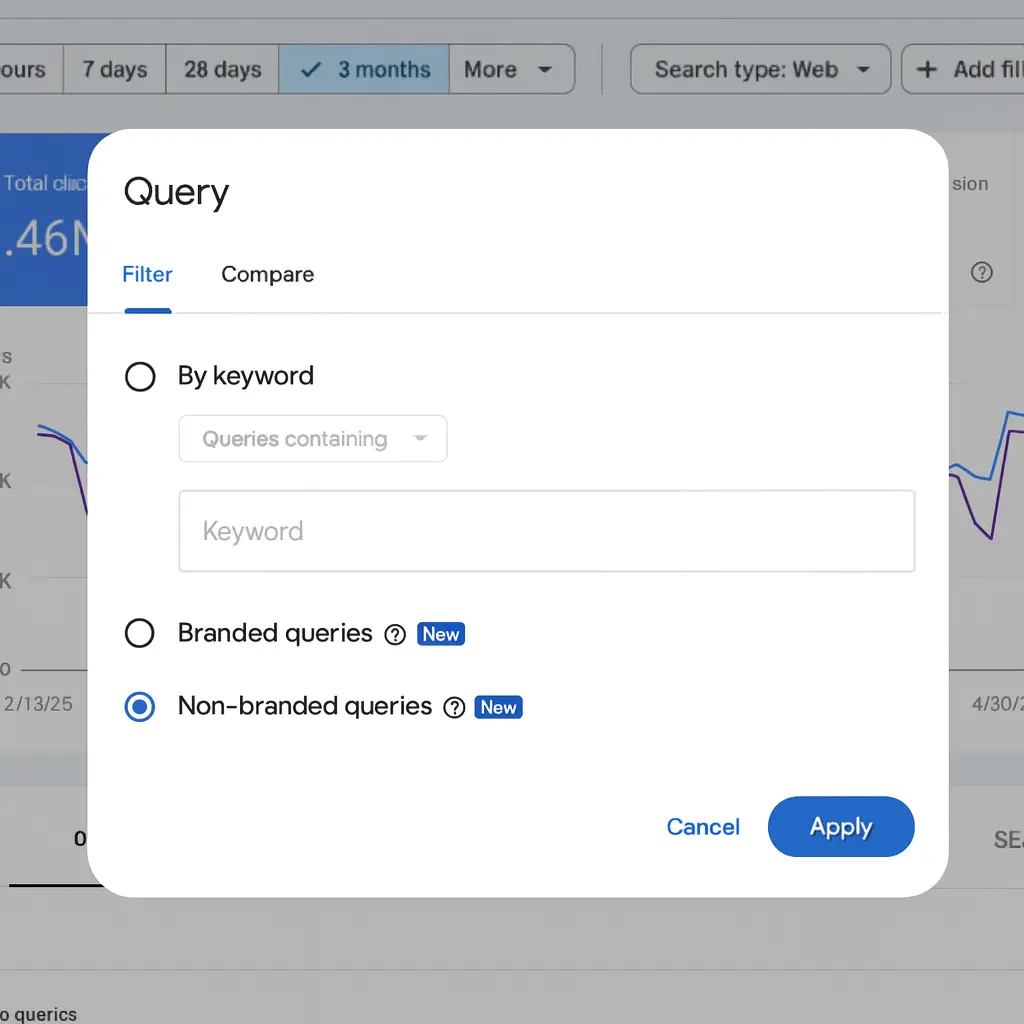
Google Search Console query filter

On the other hand, non-branded queries would be things like: 

  • “running shoes for men” 
  • “best sports shoes” 
  • “comfortable gym shoes” 

These don’t mention your brand, so these searches are from people who may not know you yet. 

Why Does This Matter?

Because branded and non-branded traffic behaves totally differently: 

Branded Traffic

People already know you. 

They’re usually searching with intention, maybe to buy, maybe to check something. 

This traffic usually has: 

  • Higher click-through rates 
  • Higher rankings 
  • Better conversions 

Non-Branded Traffic

This is where your real SEO growth comes from. 

These users don’t know your brand yet but find you because of your content. 

This traffic shows: 

  • How well your SEO is working 
  • Whether your content is helping you reach new audiences 
  • Your organic reach beyond your brand name 

So, What Did Google Add?

Inside Search Console’s Performance Report, you now get two filters: 

✔ Branded 

✔ Non-branded 

This means you can see impressions, clicks, CTR, and ranking separately for both groups. 

You can also apply this filter across: 

  • Web results
  • Image search 
  • Video search 
  • News search 

This gives you a much clearer picture of how people find you online. 

A Quick Example to Make It Crystal Clear

Let’s say you run a website called FreshFit Meals. 

Branded Queries Example:

  • freshfit meals 
  • fresh fit meal plans 
  • freshfitmeals login
  • ff meals 
  • freshfit protein bowls 

Non-Branded Queries Example:

  • healthy meal plans for weight loss 
  • best affordable diet meals 
  • weekly meal prep ideas 
  • high protein vegetarian meals 
Type Clicks Impressions CTR Position
Branded 1,800 4,000 45% 2
Non-Branded 3,200 95,000 3.4% 18

This tells you a lot: 

  • Your brand is strong → 45% CTR on branded searches 
  • You’re reaching a wider audience through non-branded searches 
  • But your non-branded ranking is lower → You need more SEO work, blogs, and optimization for those queries 

This is exactly where the new filter helps you instantly understand your real SEO performance. 

How Does Google Identify Branded Queries?

Here’s the interesting part: 

Google is not using simple keyword matching or regex. 

Instead, it uses an AI-assisted system that automatically understands: 

  • Your brand name 
  • Misspellings 
  • Brand names in multiple languages 
  • Product names unique to your brand 
  • Brand-related queries without the brand mentioned 

This means if your site is known for a unique product like “FreshFit Protein Bowl,” the query “protein bowl FreshFit style” might also be tagged as branded. 

Of course, because it’s AI-driven, some queries may occasionally be misclassified. Google admits that it is upfront. 

New Addition: Brand Traffic Insights Card

Inside Search Console Insights, you will now see a small card showing: 

  • Branded traffic (clicks) 
  • Non-branded traffic (clicks) 

This makes it easy to understand how much your brand awareness is growing over time.

When Will You See This Feature?

It’s rolling out gradually. 

If you don’t see it yet, these might be the reasons: 

1.Your property is not a top-level property 

(Meaning subdomains or /path URLs won’t have this feature.) 

2.Your site doesn’t have enough data/signals yet. 

Give it some time, it’s coming. 

Final Thoughts

This new branded vs non-branded filter is extremely helpful for: 

  • SEO planning 
  • Content strategy 
  • Brand awareness tracking 
  • Understanding user behavior 
  • Reporting to clients 

If you’re serious about improving organic performance, this feature will make your analysis much easier and smarter. 

So go ahead, open Search Console, click Performance → Search Results → and check if the new filter is live for you. 

And once you start using it, you’ll wonder how you managed without it. 

Categories
Uncategorized

Google Search Console Just Got Smarter: Custom Annotations Are Here!

Google just rolled out a significant update for Search Console users, and it’s the upgrade many of us have been anticipating 

What Are Custom Annotations? 

Think of it as adding sticky notes to your Search Console performance charts. Now you can mark important dates with your own notes, making it super easy to connect the dots between your actions and traffic changes. 

Why Custom Annotations Matters

Ever looked at your traffic graph and wondered: 

  • Why did traffic spike on March 15th?
  • When exactly did we launch that new blog category?
  • Did that site redesign help or hurt our rankings?

Now you can add notes directly on your charts to remember these crucial moments. 

Actionable Ideas You Can Start Using in Google Search Console 

Here are some practical ways to use annotations: 

Example 1: Content Updates

Date: October 5, 2025 
Annotation: “Updated top 10 blog posts with 2025 data” 
Result: Track if refreshed content improved rankings 

Example 2: Technical Changes 

Date: September 12, 2025 
Annotation: “Migrated to new hosting provider” 
Result: Monitor if site speed improvements affected traffic 

Example 3: SEO Strategy

Date: August 20, 2025 
Annotation: “Started targeting long-tail keywords” 
Result: See if your strategy shift paid off 

Example 4: External Events

Date: November 24, 2025 
Annotation: “Black Friday sale started” 
Result: Compare seasonal traffic patterns year-over-year 

Example 5: Algorithm Updates

Date: July 10, 2025 
Annotation: “Google core update rolled out” 
Result: Identify if algorithm changes impacted your site 

How to Add an Annotation on your Google search Console

It’s incredibly simple:

    1. Open your Search Console Performance Report
    2. Right-click anywhere on your performance chart
    3. Select “Add annotation”
    4. Write your note (up to 120 characters)
    5. Pick the date

That’s it! Your annotation will appear as a marker on your chart.

Best Practices

DO: 

  • Be specific and concise (you only get 120 characters) 
  • Mark major SEO changes immediately 
  • Note both wins and losses 
  • Include dates for site migrations, redesigns, and major updates 
  • Track external events affecting your niche

DON’T: 

  • Include sensitive personal information (annotations are visible to all property users) 
  • Use vague descriptions like “made changes” 
  • Forget to add dates for team activities 
  • Clutter charts with minor daily tweaks 

Who Can See Your Annotations?

Important: Everyone with access to your Search Console property can see these annotations. Keep them professional and avoid including: 

  • Personal contact information 
  • Confidential business data 
  • Internal company details that shouldn’t be shared 

Perfect for Teams

If you work with multiple people on SEO: 

  • Agencies can show clients exactly when work was completed 
  • In-house teams can coordinate across departments 
  • Freelancers can document their efforts for reporting 
  • Managers can track which strategies work 

Why You'll Love This Feature

Before annotations, you’d have to: 

  • Keep separate spreadsheets 
  • Check email histories 
  • Try to remember dates from memory 
  • Cross-reference multiple tools 

Now everything lives right where you need it in your performance charts.

Getting Started 

This feature is available now in Google Search Console. No setup required, no settings to configure. Just open your performance reports and start annotating! 

Our Recommendation

Start using annotations today for: 

  1. This week’s activities: Document what you’re working on right now 
  2. Upcoming changes: Add future dates for planned updates 
  3. Past milestones: Go back and mark major events from the last 6 months 

Three months from now, you’ll thank yourself when you can instantly see why traffic changed. 

Final Thoughts

Custom annotations might seem like a small feature, but for anyone serious about SEO, it’s a massive quality-of-life improvement. No more guessing, no more digging through old notes you have just clear, visual connections between your actions and results. 

Have you tried custom annotations yet? What are you planning to track? Share your thoughts in the comments below!